Resource management refers to the process of assigning the right people to the right work at the right time while balancing workload, availability and capacity across your portfolio of projects. With Coretime’s Resource Manager, you can see who is available, adjust plans for leave and holidays, model future scenarios and prevent over‑ or under‑utilisation before they impact delivery.
Capacity Planning & Professional Services Resource Optimisation
Coretime’s Resource Manager is a capacity planning and resource allocation tool built for professional services organisations. It gives operations leaders, project managers and resource planners real‑time visibility into team availability, workload balance and future workforce demand so you can optimise utilisation, forecast capacity and deliver projects on time and on budget.
What is “Resource Management” in Coretime?
Why Resource Management Matters for Professional Services
Effective resource planning helps you:
Maximise billable utilisation by spotting underused capacity
Reduce project delays by avoiding overallocation
Forecast future workforce needs weeks or months ahead
Improve profitability by aligning staffing with project demand
Balance workload across teams without spreadsheets or guesswork
This strategic capability
is essential for consultancies, engineering firms, architects, IT services organisations and other project‑based businesses.
Key Features of Coretime Resource Manager
Real‑Time Availability & Workload Visibility
See live resource availability and team workloads across all projects so you can assign the best‑fit resources efficiently. It tracks hours, holidays, part‑time schedules and customised employee groups.
Forward Planning & Forecasting
Forecast capacity and model “what‑if” scenarios weeks or months in advance. Use forward projections to plan hiring, schedule new work and resolve potential bottlenecks before they happen
Advanced Forward Resource Planning & Forecasting
Forecast future resource needs with Coretime’s resource management software. By projecting workload for weeks or months ahead, you can perform capacity planning, team scheduling, and “what-if” scenario modelling, ensuring your professional services resources are always balanced and productive.
Automated Alerts & Safeguards
Get automatic alerts for overallocation or potential under‑utilisation. These safeguards help keep workloads balanced and ensure you don’t assign more work than your team can realistically deliver.
Flexible “What If” Scenarios
Experiment with tentative resource plans and different team schedules without committing changes ideal for exploring options before finalising capacity plans.
Intuitive Scheduling
Adjust team schedules quickly with drag‑and‑drop functionality and real‑time heat‑map views that highlight capacity constraints and peaks at a glance.
Dual Views — People & Projects
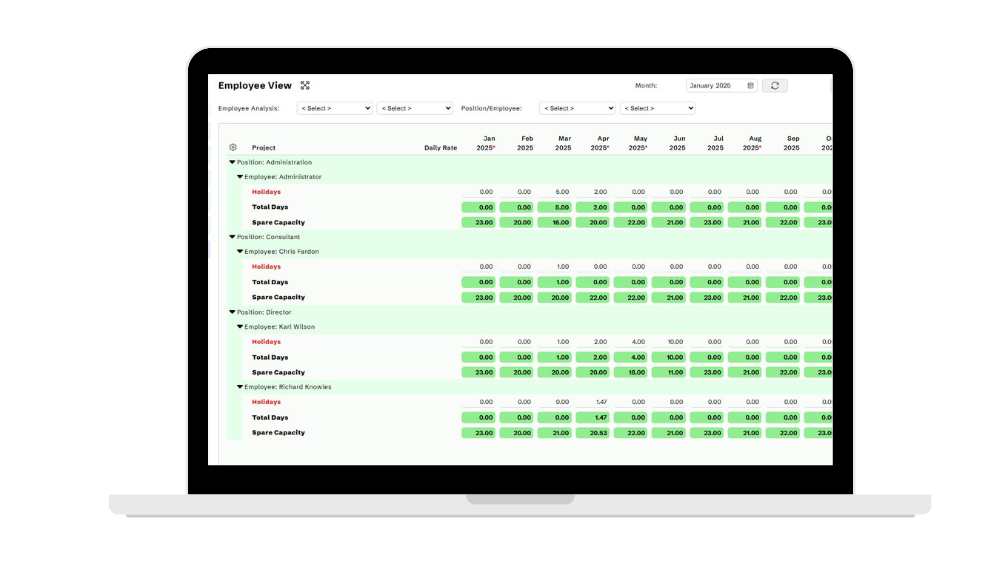
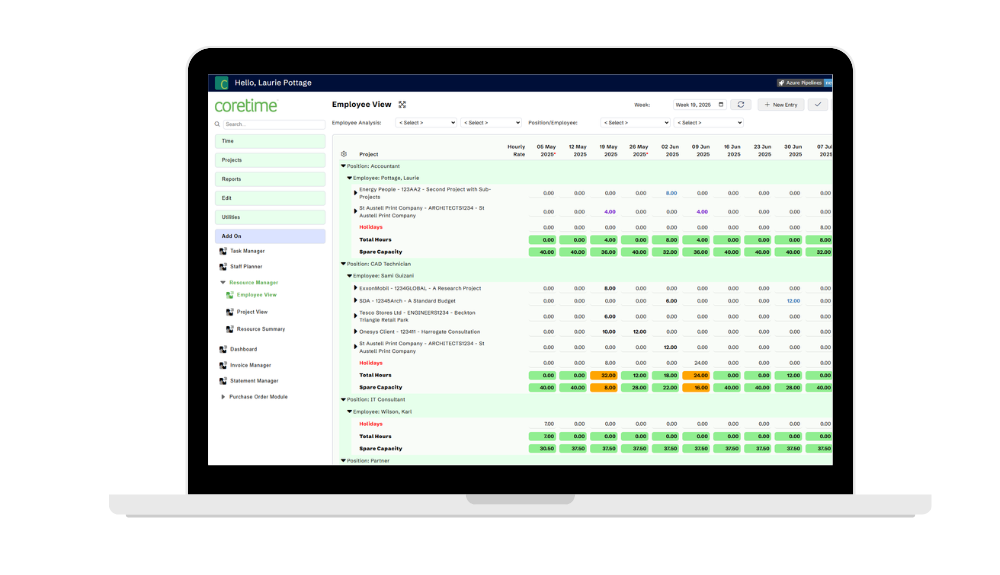
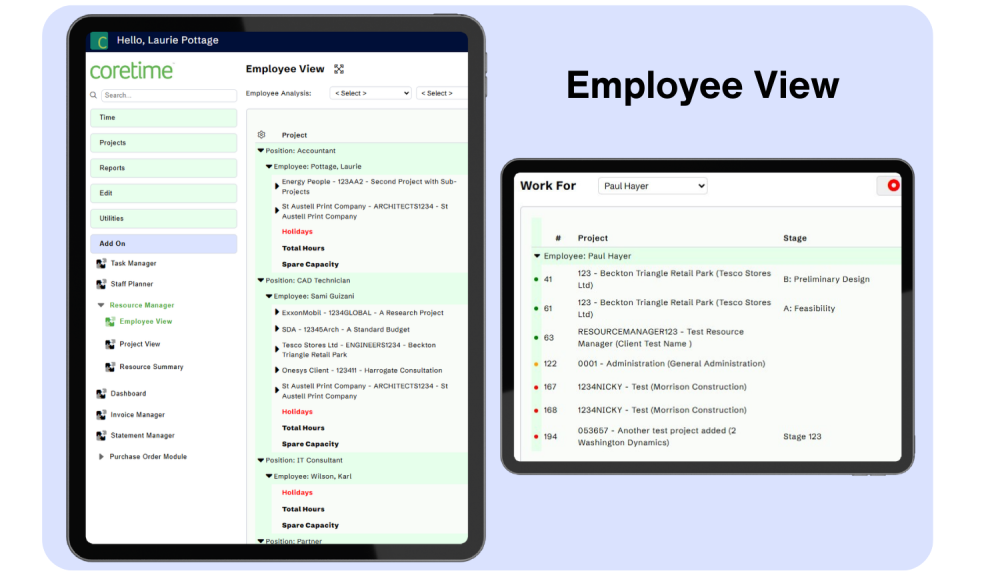
Employee View
- See all projects each team member is scheduled to work on
- Filter by custom criteria such as department, office location, or employment type
- Distinguish between FTEs and subcontractors at a glance
- Monitor individual workload distribution across projects
- Track scheduled activities that appear in each employee's "Work To List"
- See completed activities highlighted directly on screen
Project View
- View all staff scheduled to work on each project
- Access comprehensive financial information about project health
- Monitor time booked to date and cost to complete
- Filter by custom criteria including Project Manager or job status
- Track resource allocation across your entire project portfolio
- Identify projects at risk of under-resourcing
Work To List Integration
Tasks scheduled via Resource Manager appear in employee “Work To Lists,” where team members can see and complete their assignments. Updates sync automatically across the platform and feed into reports such as:
Employee Summary Report
View resource commitments by individual employees or groups across any defined time period. Perfect for capacity planning and workload balancing.
Project Summary Report
Analyse resource commitments across projects or project ranges over specific periods. Essential for project portfolio management.
Planned vs Actual Analysis
Compare planned time against actual time booked to continuously improve forecasting accuracy and resource estimation.
Heat Map Visualisation
Instantly identify periods when your resources are nearing capacity with intuitive, color-coded heat map displays. These visual indicators make it easy to spot potential bottlenecks, helping you balance workloads and plan more effectively before issues arise.
Strategic Benefits You’ll See
🎯 Proactive Capacity Planning
Move beyond reactive scheduling with Coretime’s resource management software and embrace proactive capacity planning. Identify professional services resource needs well in advance and make informed team scheduling and hiring decisions.
💰 Higher Utilisation & Profitability
Spot underutilised team members with Coretime’s resource management software and team scheduling tools, then redistribute work to optimise billable hours, capacity planning, and professional services resource utilisation, improving overall project profitability.
⚡ Early Bottleneck Detection
Get early warnings of workload peaks with Coretime’s resource management software so you can source additional professional services resources before projects are impacted, maintain capacity planning, and keep delivery schedules on track.
📊 Data‑Driven Decisions
Use planned vs actual reporting in Coretime’s resource management software to continuously refine capacity planning, team scheduling, and professional services resource allocation, enabling increasingly accurate forecasts and improving project profitability.
Who Should Use Resource Manager?
This module benefits anyone responsible for balancing team capacity, forecasting effort, or improving utilisation.
Operations & Resource Managers
Project Delivery Leads
Finance & Planning Teams
Professional Services Leaders
Interested in the Resource Manager?
👉 Book a demo to see how Coretime’s Resource Manager supports data‑driven staffing decisions and smarter project delivery.